The app
One page you open every day. Six you open a few times a year.
Most feature pages are an inventory. This one is a timetable: what you do in Simple Goals, and how often — because how often is what decides whether a tool is still open in February.
There are seven screens. One is the Month, and it is the one you live in. The other six — the direction, the year, the quarter, the history, the hours, the account — you open rarely, on purpose. A tool that needs tending every day is a second job.
Everything below is what the app does today, in a browser. What it does not do is at the bottom of this page, in the same detail.
The first evening
Three or four areas, and where each one is going.
A new account arrives with three starter categories — Work, Personal, Projects — and nothing else. The setup is short by design: under an hour, once, and then you mostly leave it alone.
- Categories
- A category is an area of your life you want to move, not a tag. Work, health, the people around you — three or four is plenty. They are edited at the bottom of the account screen, which also shows how many goals each one carries, so you can see when one has quietly taken over the others. You pick a colour from eight, rename, reorder, archive. Archived, not deleted: a chapter you have moved past still owns the goals it produced.
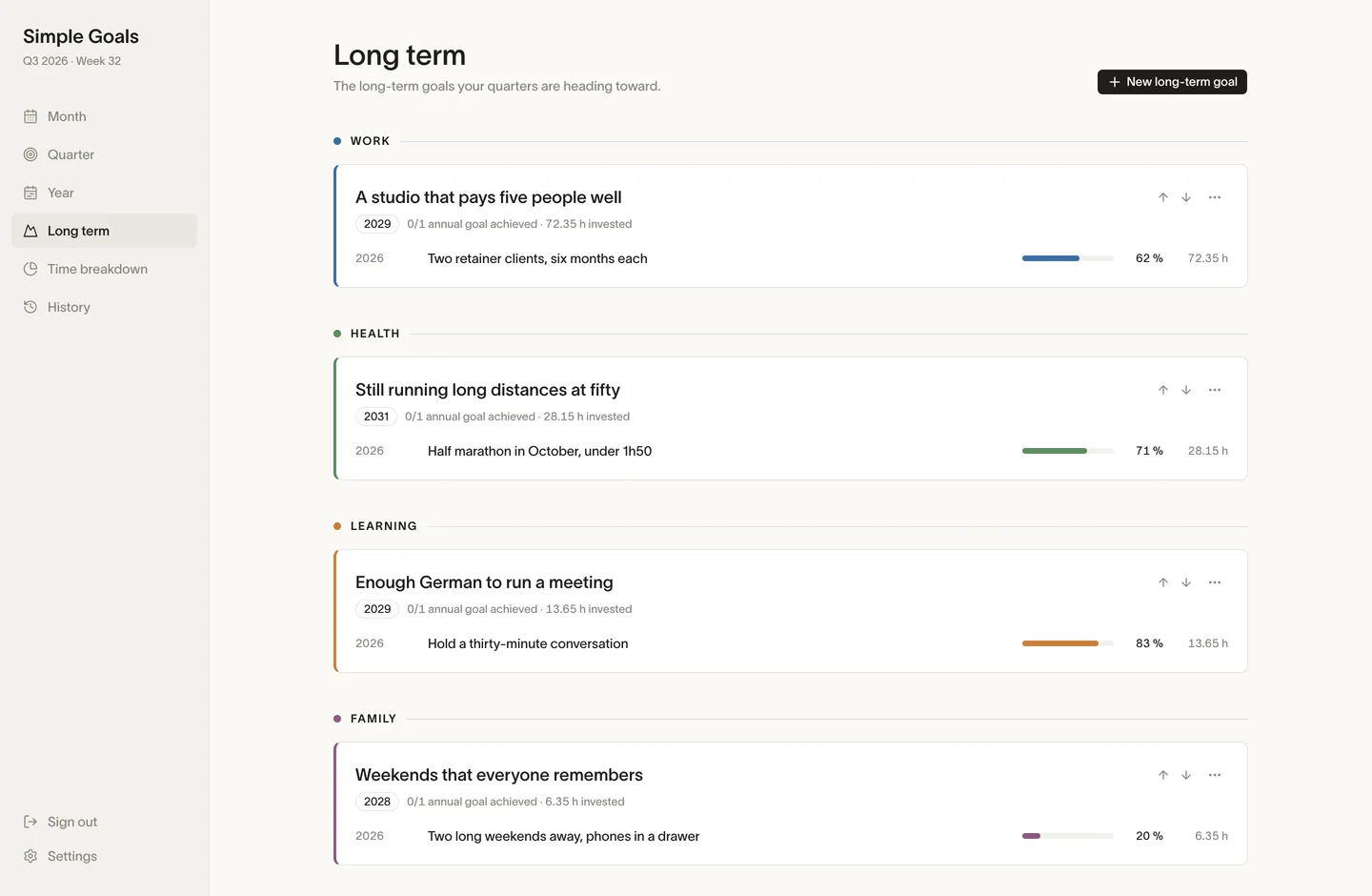
- Long term
- Two or three big goals, each with a category, a description, and an optional horizon you write in your own words — “in three years”, “before the children leave”. There is no date picker here, because at this altitude the honest answer to when is rarely a date. Each card gathers the annual goals attached to it with their progress and their hours, so a long-term goal that nothing feeds looks exactly as empty as it is. You can mark one achieved, abandon it, bring it back, or move it up the list.
- The year
- For each long-term goal, what has to be true twelve months out. An annual goal has a title, a category, a year, and the long-term goal it serves. The ones you write without attaching land in a section called “Without a long-term goal” — the app does not hide them, and does not pretend they are fine either. Previous and next year are one click away, and that is the whole of the archive.
The first Monday of a quarter
Choosing the three things the coming quarter is for.
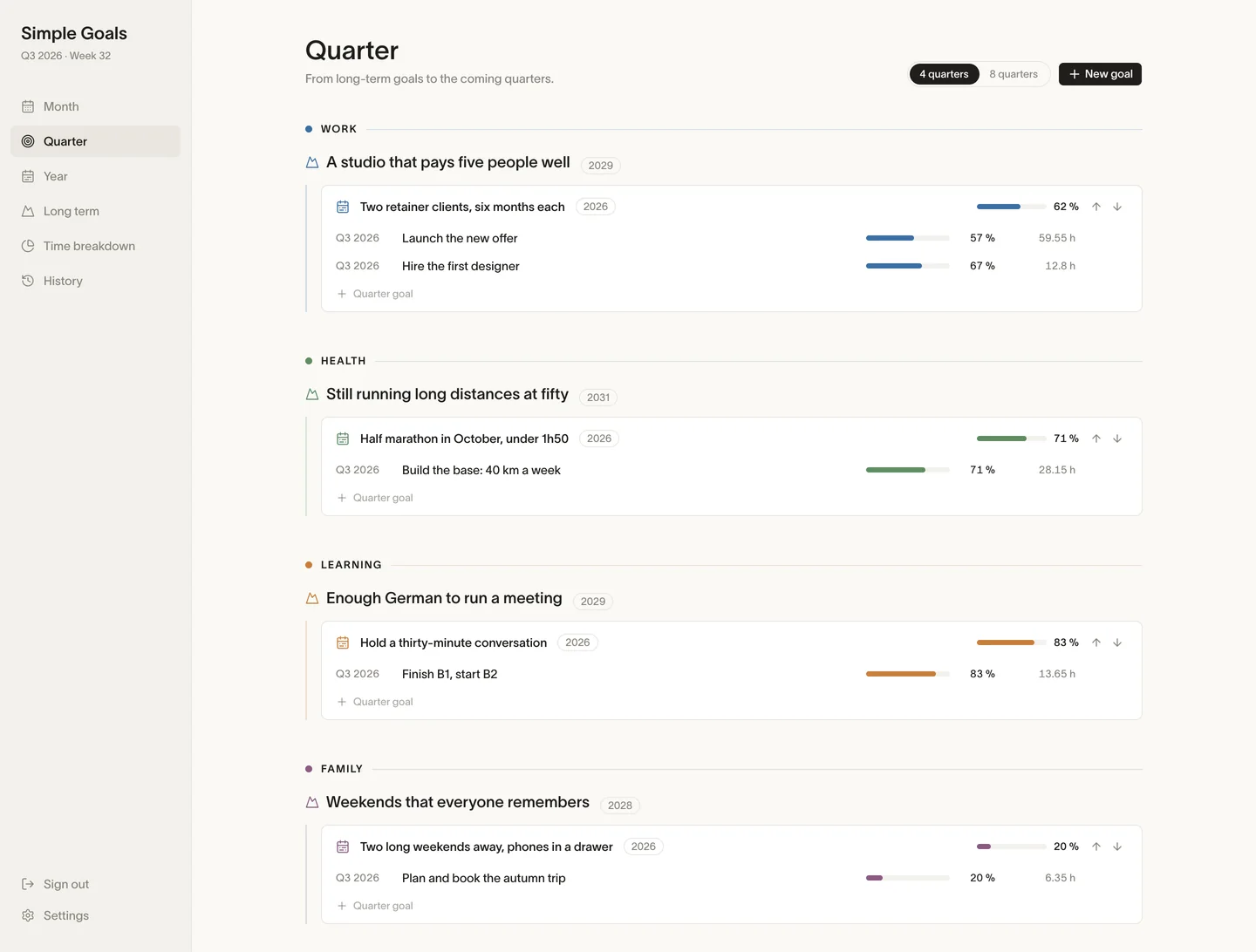
- The cascade view
- One screen laying out long-term goal → annual goal → quarter goals, category by category, over the next four quarters — or eight, if you switch the horizon. Under each annual goal sit the quarters meant to deliver it. Where nothing is planned, the app says so in words and offers to create the goal already attached, because a quarter goal typed in the wrong place is one that will never roll up to anything.
- Creating a quarter goal
- A title, a category, the quarter — from the previous one to two ahead, so you can plan early and you can fill in late — the annual goal it serves, an hours target, a description. Six fields; two of them are required. The annual-goal field only appears once that category and that year actually have one to point at.
- The quarter itself
- Cards by category. Each one carries its percentage, a band of one square per week of the quarter shaded by the hours logged that week with the current week ringed, and a “week 7 of 13” gauge — 14 in the quarters that run to a fourteenth week, because the app counts the weeks rather than assuming them. The band is the part worth staring at: it does not tell you whether you are ahead, it tells you whether you have been showing up. Previous and next quarter, same page.
- The detail panel
- Click a card and everything is editable in place — title, category, annual goal, description, hours target. Three things live only here. The first is a slider that overrides the computed progress: the automatic figure counts ticked todos, and some goals are held in a way that never produces a todo. One click puts it back on automatic, and a goal running on the slider is labelled manual next to its percentage, so no number on this site is ever quietly hand-made. The second is status — achieved, abandoned, reactivated. Abandoning is a first-class action with a word of its own, because dropping a goal in week six is a decision, and it should read like one rather than like a card you deleted to tidy the page. The third is deletion, and deletion is the one that can refuse.
- Because a goal that already has todos or hours cannot be deleted. The app tells you to abandon it instead, to keep the history. It is one of the two places Simple Goals says no to you — the other is the rituals block, further down — and it is on purpose: a quarter you can erase is a quarter you will learn nothing from.
Every day
The Month is the page. The rest is settings.
- What is on it
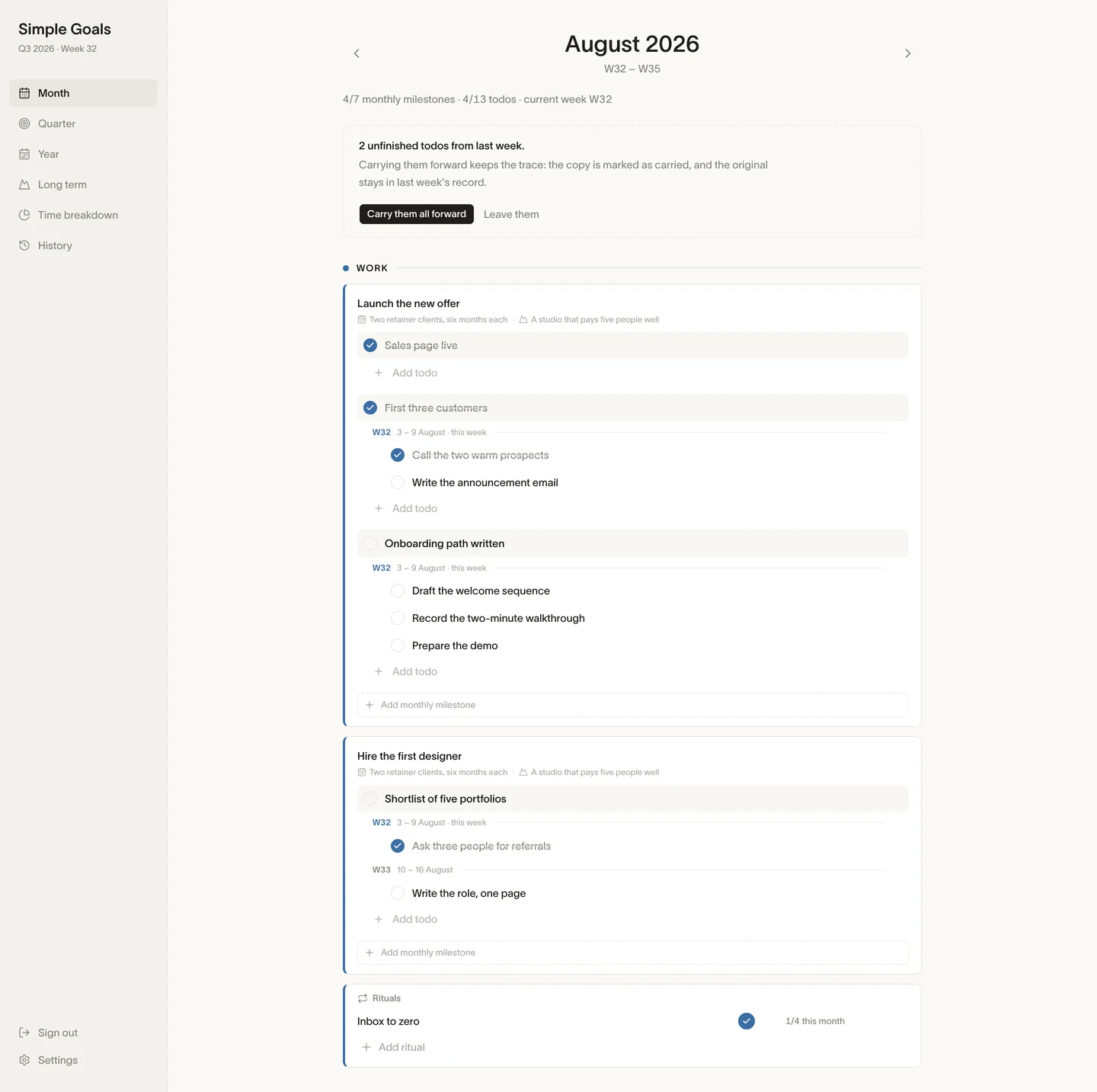
- Per category, the quarter goals still running. Under each goal, the milestones for this month. Under those, the todos, grouped week by week — W31, W32, W33 — each week with its own field for adding one. The line at the top reads 3/7 monthly milestones · 12/29 todos · current week W32. Ten seconds, and you know where you stand.
- Todos
- Add one in the week you mean it for, tick it, double-click to rename, delete. Move it to another week by dragging it, or through the ⋯ menu, which also reaches the last week of the previous month and the first of the next — a week does not stop at a month boundary and neither does the menu. Dragging stays inside one quarter goal, and so does everything else: a todo belongs to the goal it was written under, and nothing in the app moves it to a different one. If it turns out to serve something else, you delete it and write it where it belongs.
- What last week did not finish
- On the current month, a band at the top of the page counts the todos still open in the week just gone — 3 unfinished todos from last week — with “Carry them all forward” and “Leave them”. The same thing, one todo at a time, sits in the ⋯ menu as “Carry forward to next week”. Carrying is not moving: the copy lands in next week and the original stays where it was, struck through and marked carried forward, so last week’s record still says what actually happened. Dismiss the band and it stays dismissed for that week, not just for that visit.
- Monthly milestones
- Create, rename, tick, reorder with arrows, delete. Attach a todo to a milestone, or detach it. Whatever is unattached collects in “Misc”, at the bottom, still under its goal. Misc is a feature: a month where Misc is longer than everything above it is a month that went to maintenance, and you should be able to see that without anyone telling you. Deleting a milestone never deletes its todos — they fall back into Misc.
- Getting around
- ‹ and › for the previous and next month, a “This month” button, and a “past month” badge so you never edit August believing it is September. From the keyboard: ← and → change month, C returns to the current one, N drops the cursor into the add-todo field. A page you open every morning should not require the mouse.
Three times a week
The things that never get finished.
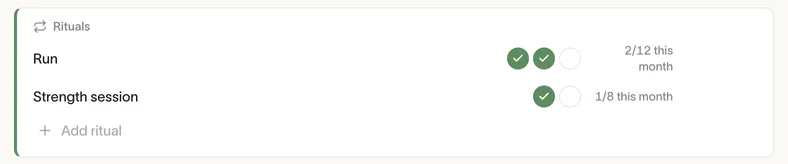
Under each category on the Month page sits a block for what a goal cannot hold: run three times a week, one cinema a month, call your mother on Sundays. These have no finish line, so a percentage would be meaningless.
You give a ritual a title, a count and a cadence — three per week, one per month, twice a day — and, if it serves something, the annual or quarter goal it belongs to. After that it is dots to tick, with the month’s count in the header: 9/12 this month. Rename it, pause it when the season changes, archive it, bring it back, reorder it, delete it.
Nothing here counts a streak, and nothing breaks. A ritual counts what you did, not what you owe. Pause exists so that a month off is a decision you record rather than a run you snap. If you delete a ritual, the app first tells you how many ticks go with it and suggests archiving instead.
One limit, in place: rituals are editable on the current month only. Open August in October and the block is still there, read-only — you can read what you did, you cannot backfill it. The dots always tick the current week, never a week you choose. It is a hard rule and it is the right one for a habit, but if you were hoping to reconstruct three months of them on a quiet Sunday, this is not the app.
Friday, fifteen minutes
Closing the week, and once a quarter closing the quarter.
- Weeks
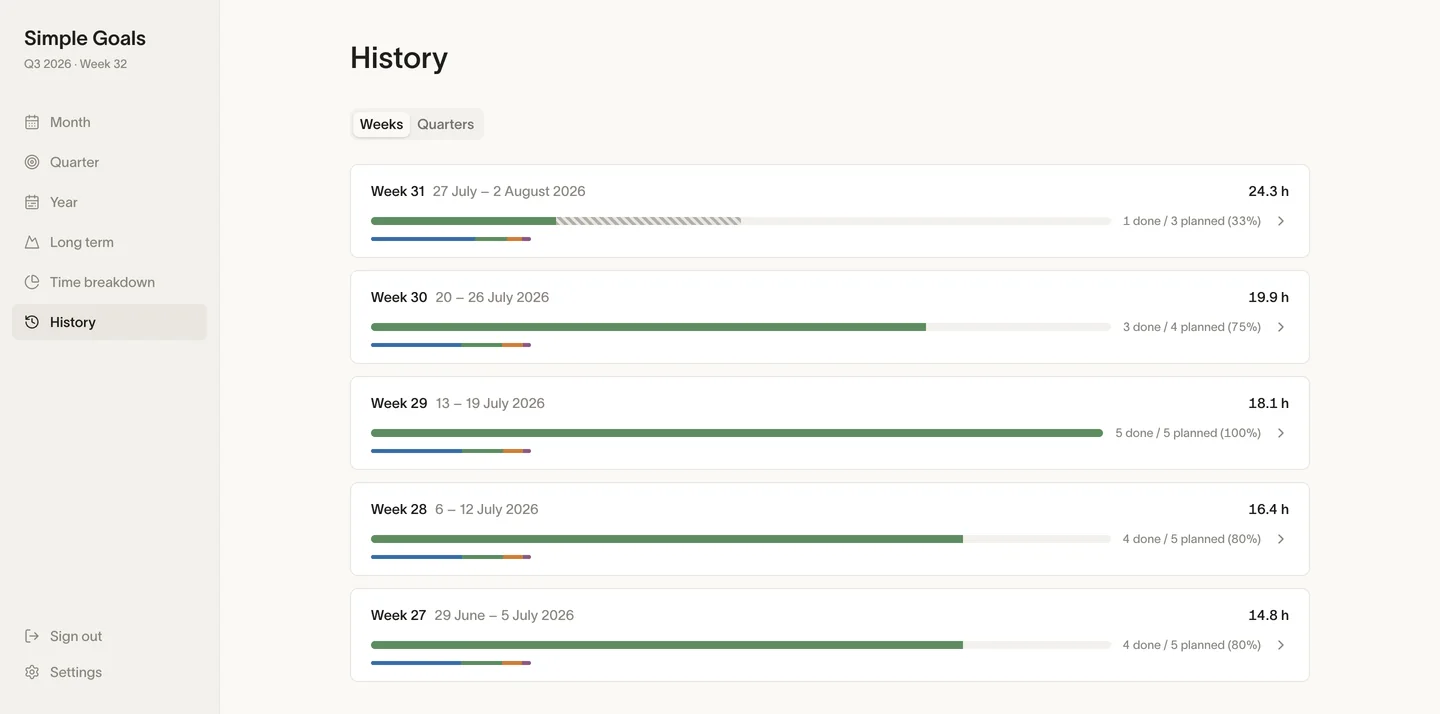
- One card per past week that carried todos or hours — a week where nothing was written never appears — folded by default. Unfold it and you get the planned-versus-done bar, the hours, the todos listed under the goal each one served, that week’s rituals, and the time that went outside every goal. That last line is the useful one: the week where nothing moved is almost never the week where nothing happened.
- Quarters
- The same thing one level up — each quarter’s goals with their percentage, their status, and their hours against the target. A whole quarter fits on one screen, and that is the only altitude from which you can see that a goal was already lost in week three.
- Retro notes
- A free-text field on any week and any quarter, saved when you leave it. One line is enough — too many meetings, the demo ate the week — and it is the thing that makes the quarterly review possible three months later, when you still remember the outcome and none of the reasons.
When you want the numbers
The hours, and the part that is not there yet.
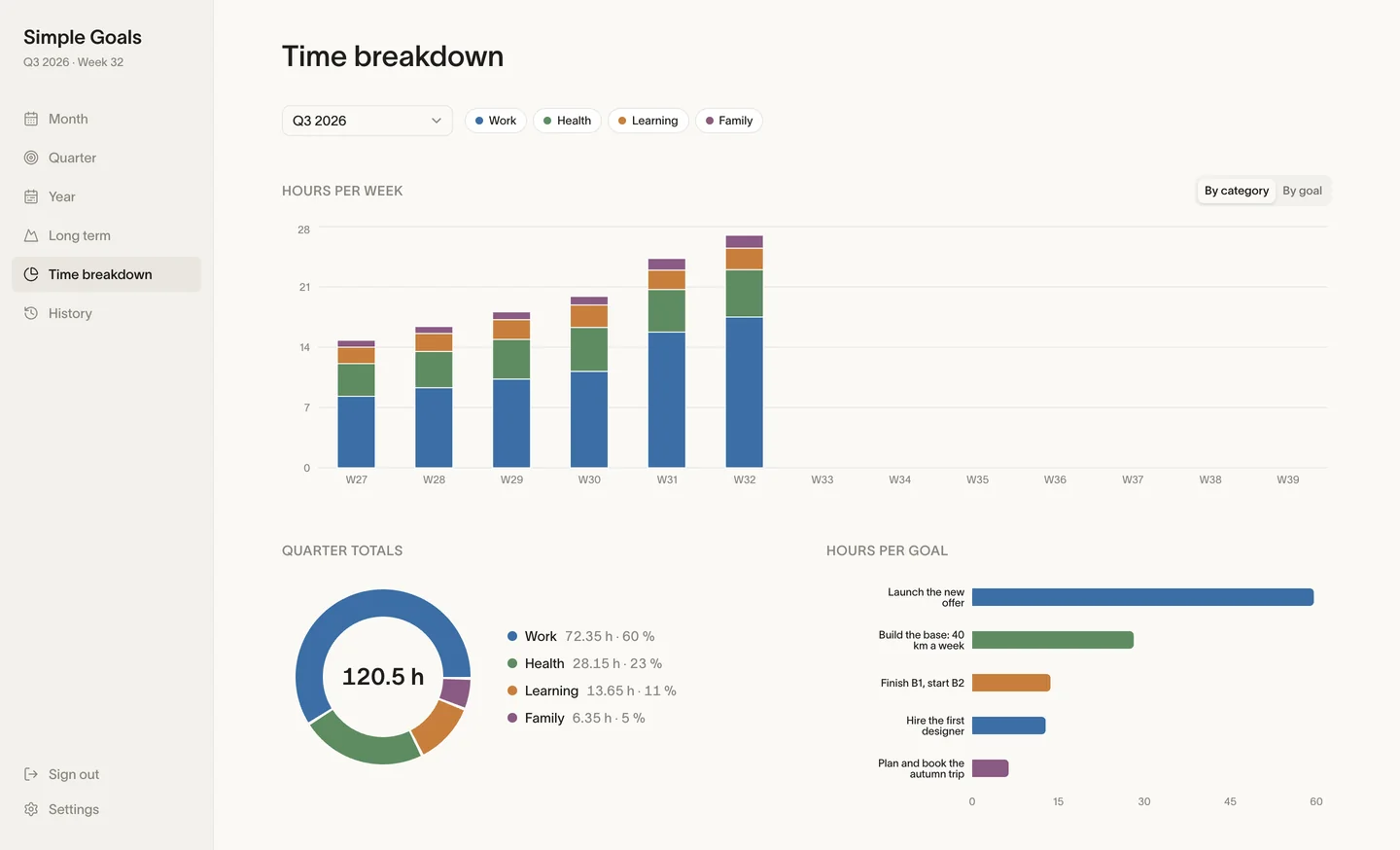
The Time breakdown screen reads back what has been logged: stacked bars per week, by category or by goal; a doughnut of the quarter or of the full year; bars per goal with a marker where the target sits. You pick from the last few quarters and the next one, or the current year in full, and filter by category.
Now the honest part, and it is the largest gap in the web app: there is no field in the browser for logging an hour. You can set a target on a goal — that is edited here, in the detail panel — but the hours themselves are recorded outside the browser. If the browser is all you use, this screen stays empty, the weekly bands on the quarter cards stay blank, and the history reads zero hours. Nothing is broken; the input is simply not written yet.
It is on this page anyway, because you would have found out on your first Friday, and finding out here is cheaper.
Whenever you want out
Your account, and the door.
- Identity
- Your username never changes — it is who you are in the app. Your email address does, and asks for your password to do it, because an address is how an account gets taken. The language switch is here too, French or English, and it moves the whole app, server error messages included.
- Password and sessions
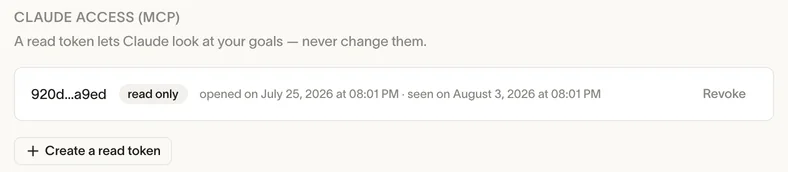
- Changing your password closes every session, this one and the one on your phone; you sign back in. Below it, the sessions themselves: when each opened, when it was last used, and which one is you right now. Revoke one, or sign out everywhere in a single click. Only sessions that can write are listed here; read-only Claude tokens have their own block, just underneath.
- Claude access
- You can generate a token that lets Claude read your goals; the connector URL comes with it, and the token itself is shown once. The scope is read-only, and that is not a preference you could flip — the server refuses every write made with those tokens. Claude can tell you that you have not touched a goal since June. It cannot tick anything, create anything, or delete anything.
- Export
- One button, one JSON file, all of it: categories, long-term goals, annual goals, quarter goals, monthly milestones, todos, hours, rituals, ticks, retro notes. No form to fill in, nobody to email, no wait. It even contains rows for a couple of things the browser has no screen for yet — that is not a mistake, it is the same database, and you get the whole of it.
- Deletion
- Retype your username and everything goes, in one transaction, with no grace period and no thirty-day recycle bin. It has to be that plain, otherwise the export button sitting next to it is a courtesy rather than a right.
To be clear
What it does not do.
Nothing below is a roadmap. It is the state of the app on the day this page was written.
- No calendar, no timeboxing, no sync
- Simple Goals reads no calendar and writes to none, and pulls nothing out of Jira, Notion, Slack or your inbox. Nothing lands in your week that you did not put there. That is the trade: the week stays quiet, and filling it is entirely on you.
- No hours from the browser
- The screen that shows them exists; the field that records them does not. Repeated here so it is impossible to miss.
- No weekly screen
- The week is a grouping inside the Month page — headings, add fields, a carry-forward band — not a page of its own. Old /week links open the matching month.
- No moving a todo to another goal
- It stays under the goal it was written under. You can change its week; you cannot change its parent.
- No notifications, no reminder emails, no streaks, no badges
- The only mail it ever sends is the kind you asked for: your invitation, a welcome message when the account is created, a password reset. It never writes to tell you your goals miss you. It is a notebook — it waits.
- Not a phone page
- The app assumes a wide window — a fixed 220-pixel sidebar, no hamburger menu, no phone layout. It is fine on a laptop and cramped on a phone, and calling it responsive would be a lie you would catch in under a minute.
- No import
- The export goes one way. There is nothing that will suck in a Notion database or a Todoist list. You retype what matters, which for two or three goals per category is twenty minutes and a useful filter.
- By invitation
- There is no open sign-up button. You ask for an invite, someone reads it, and a code comes back when a place opens. Slower than a form, and deliberate.
- Two languages
- French and English, chosen on the account. Nothing else.
The method all of this runs on is written out in full, for free, on the method page — read that first if you want to know what you would be signing up to. The beta is free and opens up gradually.